Welcome Back Bot_342

Don’t have an account?

StractiAI Registration×

Welcome to StractiAI!

You can create an account for free but you will need to purchase a plan to start botting.

StractiAI Login ×

Stracti - Build AI game bots with no code required | Product Hunt

Stracti

Smart AI Bots

The ultimate neural framework for automation.
Build intelligent bots for any application using high-precision object detection.
Documentation & API Reference

Create AI Bots for
The Endless Grind with
STRACTI v3.0.0

Detect. Automate. Deploy.

The ultimate neural framework for automation. Build intelligent bots for any application using high-precision object detection.

Documentation & API Reference

Limited Lifetime Sale

Offer ends in:
23h
:
59m
:
59s
Monthly Lifetime A Special Gift

Lite

$40
$30 /life

SERVERS

  • Shared Public Servers
  • Occasional latency
  • Standard uptime (95-99%)

CORE FEATURES

  • Access to AI Client & Browser
  • Unique user profiles
  • Stracti Anti-ban

USAGE LIMITS

  • Create 1 custom bot
  • Up to 2 Games
  • 50 Tokens /day

PERFORMANCE

  • 5 second delay
Get Lite Lifetime

Starter

$99
$80 /life

SERVERS

  • Shared Public Servers
  • Occasional latency
  • Standard uptime (95-99%)

CORE FEATURES

  • Access to AI Client & Browser
  • Unique user profiles
  • Stracti Anti-ban

USAGE LIMITS

  • + Create 3 custom bots
  • + Up to 3 Games
  • + 100 Tokens /day

PERFORMANCE

  • + 3 second delay
Get Starter Lifetime

Pro

$249
$199 /life

SERVERS

  • :: Private Dedicated Servers
  • :: Consistent low-latency
  • :: Guaranteed uptime (99.9%)

CORE FEATURES

  • Access to AI Client & Browser
  • Unique user profiles
  • Stracti Anti-ban

USAGE LIMITS

  • + Unlimited Bots
  • + Unlimited Games
  • + 500 Tokens /day

PERFORMANCE

  • + 1 second delay

COMMUNITY PERKS

  • + Special Discord Role
Get Pro Lifetime
Happy New Years Hardware Spoofing Cloud Hosted Anti-Ban Protection Instant Delivery
Welcome to StractiAI

StractiAI is a powerful, vision-based automation platform designed to create, manage, and deploy sophisticated bots for any game or desktop application. By analyzing the screen just as a human does, StractiAI avoids intrusive methods, offering a safer and more flexible way to automate tasks.

This guide will walk you through everything from the initial setup of your environment to building complex, multi-step bots with conditional logic. Whether you're a beginner or an experienced scripter, you'll find all the information you need here.

Initial Setup: Getting Started from Scratch

Before you can build your first bot, you need to set up your account and local environment correctly. Follow these steps carefully.

Step 1: Prerequisites

The StractiAI desktop client relies on two essential pieces of software. Please install them before proceeding:

  • Node.js (Version 20): The client runs on the Node.js environment. You must use Version 20. If you have another version installed, please uninstall it first. You can get the correct version here: Download NodeJS v20.
  • Python (Version 3.10+): Python is used for underlying computer vision tasks. You can download the latest version here: Download Python.

Step 2: Your Account PIN

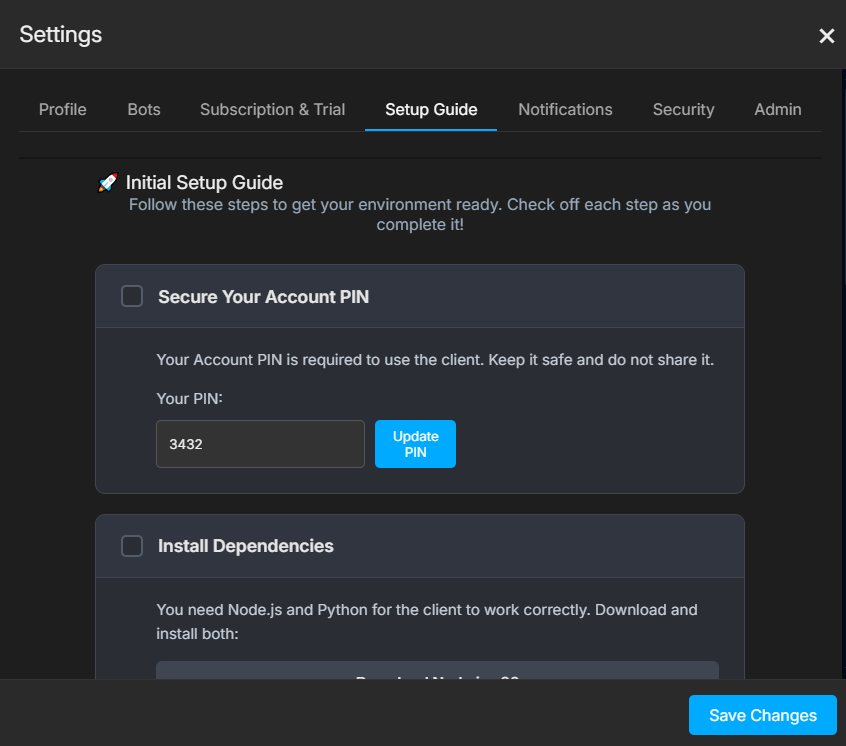
Your PIN is the key that links your web account to the desktop client. You must generate one to use the software.

  1. Log into your StractiAI account on the website.
  2. Open the Settings panel (usually via the user icon or menu).
  3. Navigate to the Setup Guide
  4. You must first have an active subscription. Your unique PIN will be displayed.
  5. Important: Keep this PIN safe and do not share it. You will need it to connect your client.
  6. Settings Panel showing the Setup Guide tab

Step 3: Download and Unzip the Client

The StractiAI desktop client is available for download after you have an active subscription or trial. You can find the download link in the Setup Guide tab within the Settings panel on the website. Once downloaded, unzip the file to a permanent location on your computer (e.g., C:\StractiAI) or desktop.

Connecting Your Client

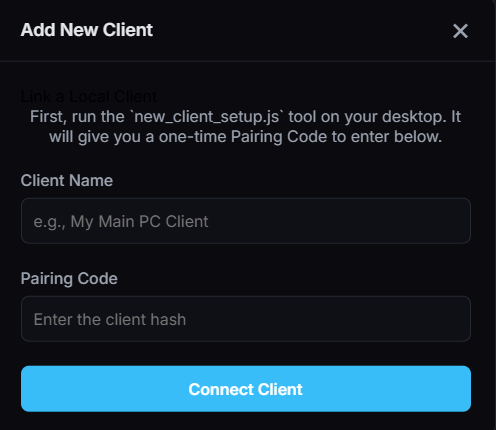
A "Client" in StractiAI is a connection to a machine where a game or application is running. The client setup script allows you to connect machines on your local network or anywhere else.

On the Web Dashboard:

  1. Click Add New Client to open the setup wizard.
  2. Choose to set up a Local Client (same PC) or an External Client (different PC/VM).

For a Local Client:

  1. In the client folder, run node setup.js.
  2. Select Setup a Local Client from the menu.
  3. Enter your Account PIN when prompted (first-time only).
  4. Choose the application window you want the bot to interact with from the list.
  5. The script will generate a temporary Pairing Code. Copy it.
  6. Back on the web dashboard, give your client a name and paste the Pairing Code to finish.
  7. Local client setup process

For an External Client:

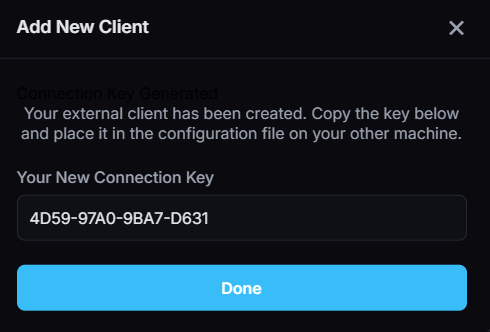
  1. On the web dashboard, select "External Client", enter a name, and click Generate Connection Key. Copy the key.
  2. On the external machine, run node setup.js and select Setup an External Client.
  3. Paste the Connection Key when prompted. The machine is now linked to your account.
  4. External client setup process

The Dashboard: Your Control Center

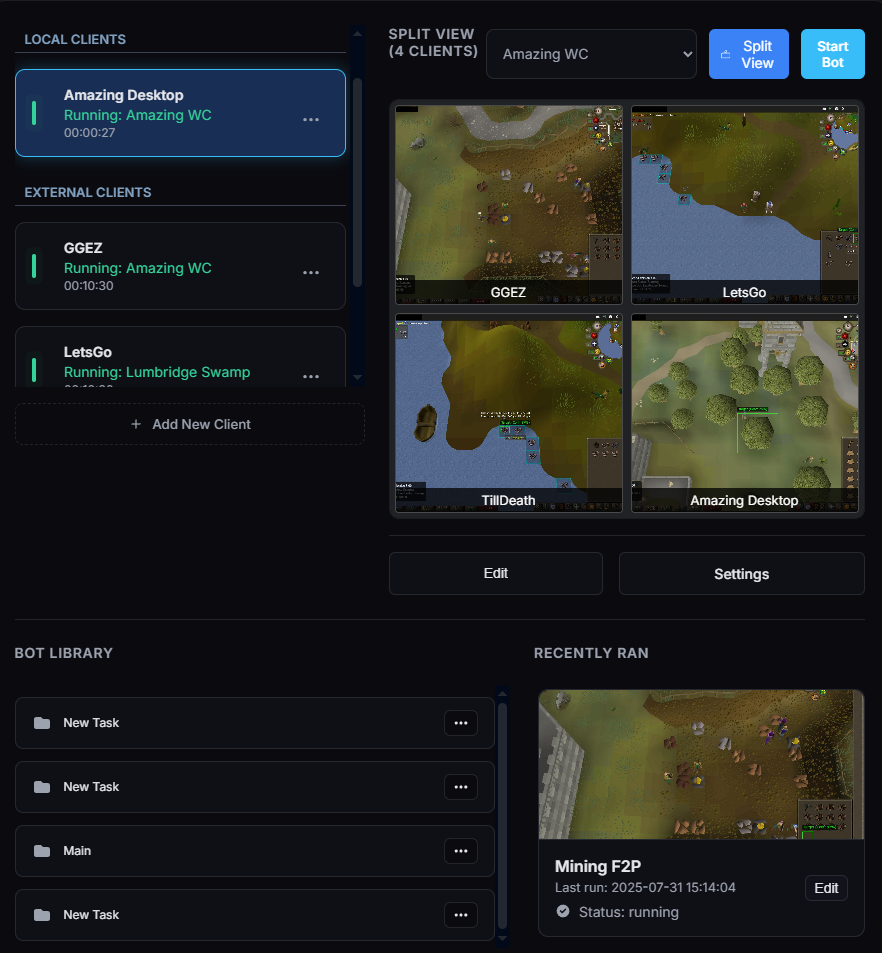
The main dashboard is where you manage all your clients and bots from a single interface.

  • Connected Clients List: On the left, you'll see all your configured clients. You can see their status (Online, Offline, Running) and select one to manage.
  • Client Control Panel: When you select a client, this central panel becomes active. Here you can see a live view of the client's screen, assign a bot to it, and use controls like Start, Stop, and Pause.
  • Bot Library: This section lists all the bots you have created.
  • Recently Ran: A history of your recent botting sessions for quick access.
StractiAI Dashboard Overview

Managing Multiple Clients

StractiAI is built to handle automation across multiple machines from a single interface.

Client States

  • Running: The client is connected and a bot is actively running.
  • Paused: The client is connected, but the assigned bot has been paused.
  • Idle: The client is connected and waiting for a bot to be started.
  • Offline: The client is not connected to the StractiAI service.

Split View

For users running bots on multiple clients, Split View is an essential feature. Click the Split View icon in the control panel to see a live grid of all your active clients. This provides a command-center overview of all your automation tasks at once.

The Bot Editor: Your Workspace

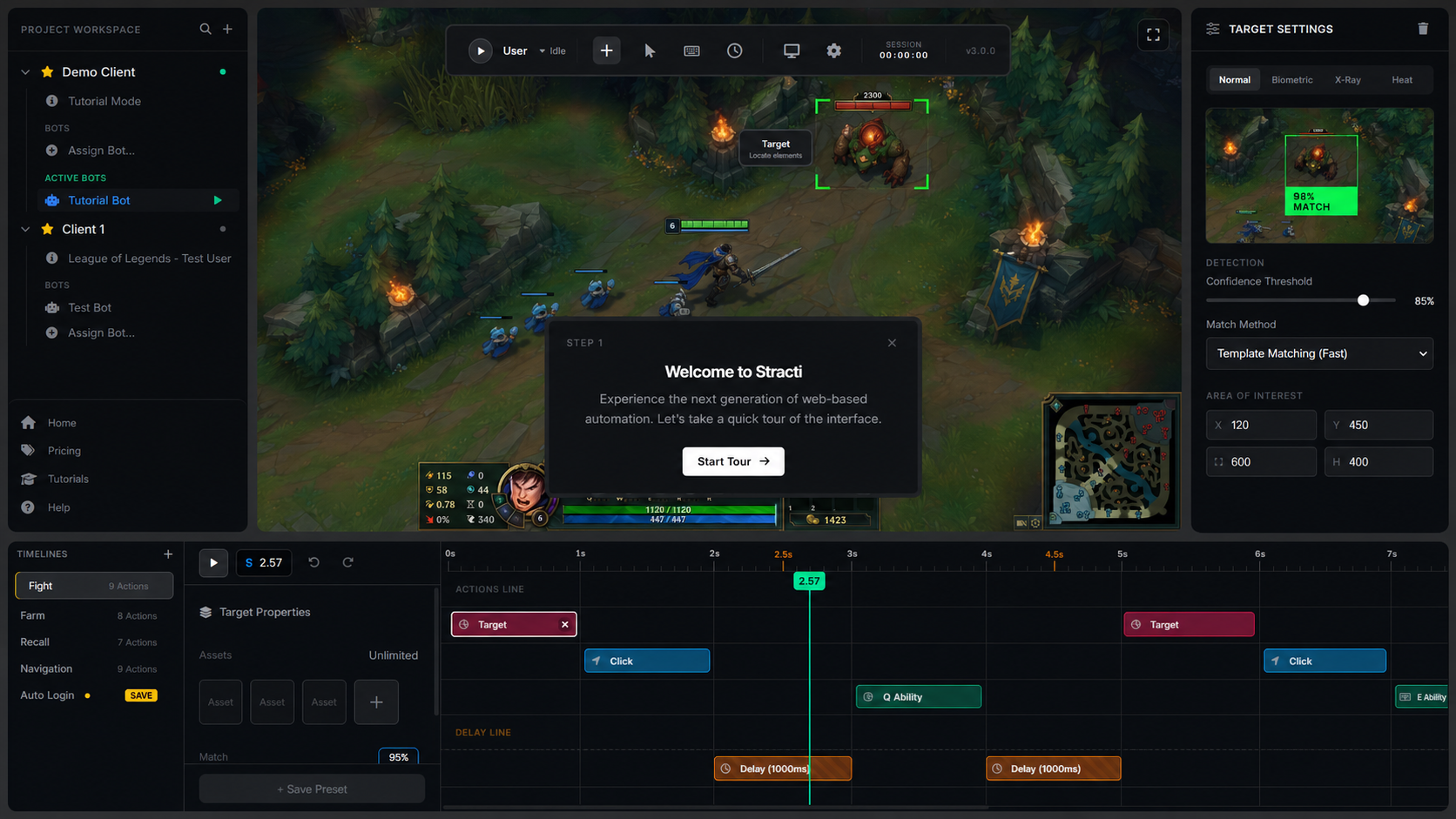
The Bot Editor is where you'll build, test, and refine your automation tasks. It features a powerful, color-coded timeline and an intuitive interface.

  • Timeline Categories: Actions are organized into three color-coded categories: Search (visual detection), Action (clicks, key presses), and Timing (delays).
  • Drag & Drop: Easily reorder actions by dragging and dropping them on the timeline.
  • Enable/Disable Commands: Temporarily disable any action or an entire row to debug specific parts of your logic without deleting anything.
  • Bot Tabs: Work on multiple bots at once. Each bot opens in its own tab, and your session is saved automatically.

Creating Your First Bot: A Step-by-Step Guide

A bot in StractiAI is a Task. A Task contains a timeline of Actions that are executed in sequence. Let's build a simple bot that finds an object and clicks it.

Step 1: Create a New Bot

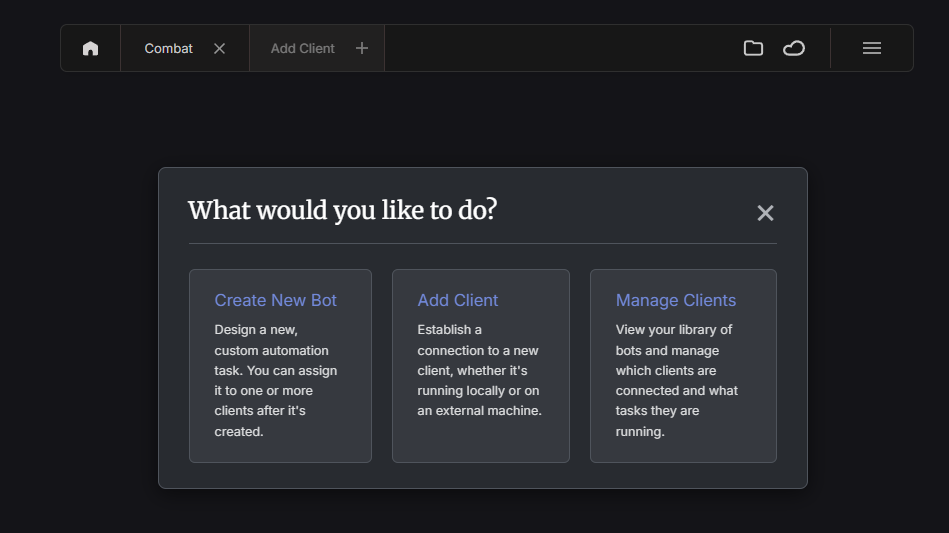
From the main page, click the "Add Client +" button and select Create New Bot.

Add New Bot button

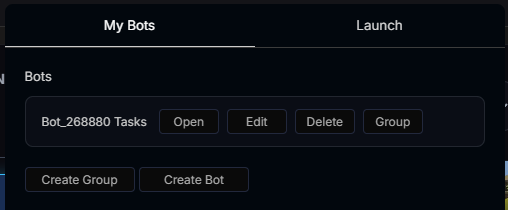
This takes you to the Bot Editor. In the left panel, click "Create Bot", give it a name (e.g., "My First Miner"), and click on it to open its timeline.

Create New Bot in the editor

Step 2: The Target Action

Every bot must begin with a Target action. This is the primary object the bot will look for to start its sequence.

  1. Make sure your game or application is running and visible on the client machine.
  2. In the Bot Editor, click the "Target" tool from the toolbelt on the left.
  3. Target action button
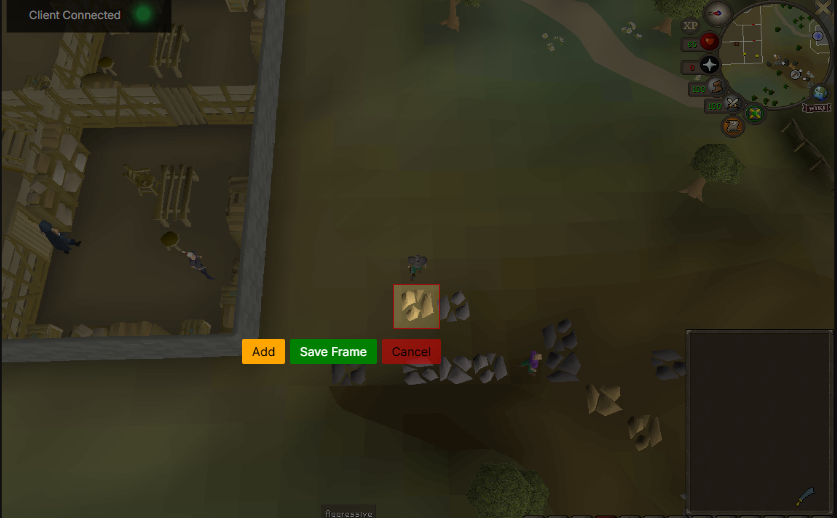
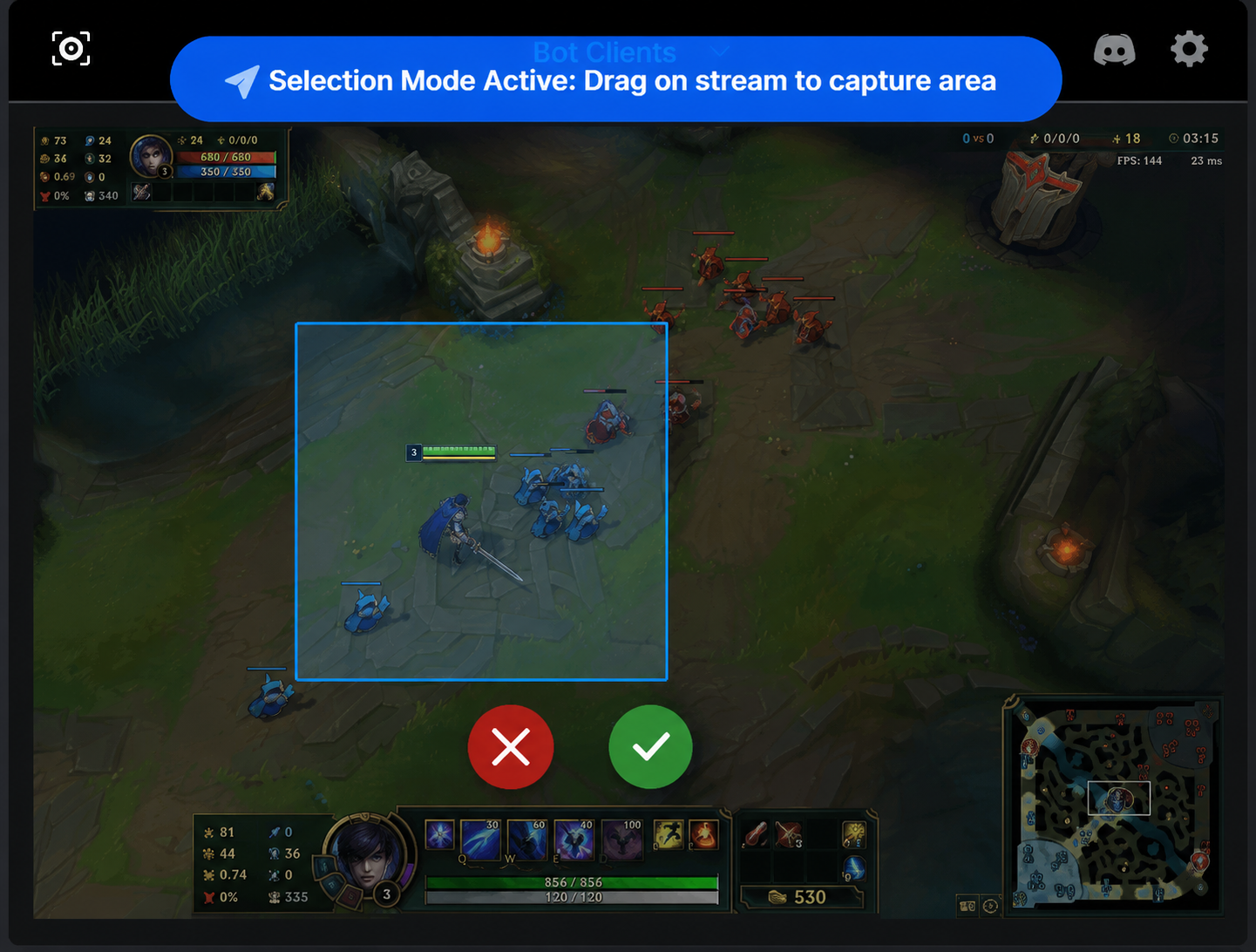
  4. On the live stream image, click and drag a box around the object you want the bot to find.
  5. Selecting a target on screen
  6. A [Save Frame] button will appear. Click it to create the first action on your timeline.

Step 3: The Click Action

Now, let's tell the bot what to do after it finds the target. Click the "Click" tool from the toolbelt. This action is automatically added to the timeline and tells the bot to left-click the center of the object it just found.

Click action added to the timeline

Step 4: Save and Run Your Bot

Click the main "Save" button for the bot. To run it, ensure your client is running and press the "Start" button in the control panel.

Start bot button

Core Concept: The Action Timeline

The timeline is the heart of your bot. It's a sequence of actions executed from left to right. Understanding how to manipulate it is key to building powerful bots.

  • Assets vs. Regions: An Asset is the specific image you want to find (e.g., a copper ore rock). A Region is a larger area on the screen where the bot should limit its search (e.g., only the inventory panel). Using regions makes detection faster and more accurate.
  • Modify Selection: Right-click an action and choose this to change the image asset(s) it looks for.
  • Update Region: Right-click an action and choose this to change the rectangular area the action searches in, without changing the image asset.

Core Concept: Detection Modes

StractiAI offers several detection modes to handle different situations with precision.

  • Regular Mode: The standard image-matching mode. It looks for an exact visual match of the asset you provided.
  • Color-Only Mode: Ignores shape and looks only for a specific color or HSV range. Perfect for targeting health bars, glowing items, or other color-defined elements.
  • Hybrid Mode: The most powerful option. It combines both shape (Regular) and color matching, drastically reducing false positives by requiring both criteria to be met.

Debugging Detections

The overlay provides visual feedback with color-coded bounding boxes to help you debug:

  • Red: A successful match! Confidence is at or above your threshold.
  • Orange: A near miss. Confidence is very close to the threshold.
  • Yellow: A medium miss. Confidence is further from the threshold.
  • Light Blue: A distant miss. Confidence is significantly below the threshold.

Core Concept: Multi-Target Handling

The Multi-Target handling mode is a massive efficiency boost for bulk tasks. Instead of finding and acting on objects one by one, it finds all of them at once and then acts on them sequentially.

Example: Dropping a full inventory.

  • Single Mode (Old): Scan -> Find Fish #1 -> Drop Fish #1 -> Scan -> Find Fish #2 -> Drop Fish #2... (28 scans total)
  • Multi Mode (New): Scan once -> Find all 28 fish -> Drop #1, Drop #2, ... Drop #28. (1 scan total)

This is ideal for dropping, looting, or crafting multiple items in a row.

Core Concept: Multi-Region Selection

You can assign multiple, independent search zones to a single command. This allows for precise targeting without needing to create complex scenarios or duplicate tasks.

Example: Mining two specific rocks.

Instead of making two separate tasks, you can use one "Find Ore" command. Right-click it, select "Modify Region," draw a box around the first rock, click "Add Region," then draw a box around the second rock and click "Add Region" again. The bot will now only search in those two specific areas.

Advanced Feature: Action Sets

An Action Set is a powerful macro that condenses a complex sequence of actions into a single block on your timeline. It's designed to clean up repetitive logic like Find -> Click -> Delay.

Instead of a long, cluttered timeline, you can create one Action Set that contains all the steps. You can even set a "Master Search Area" from the initial target, forcing all subsequent steps to search only within that region.

Advanced Feature: Scenarios & Conditional Logic

Scenarios are pre-planned "what if" routines that you attach to an action. They allow your bot to react intelligently to different outcomes.

  • On Failure: Define what the bot should do if it fails to find its target (e.g., after 3 failures, run a "get unstuck" scenario).
  • On Success: Trigger a special subroutine the moment an action succeeds.

Each Scenario has its own separate timeline. You can even chain multiple "On Failure" scenarios to a single action; the bot will try each one in sequence until one succeeds.
Focus Mode

When you set up logic that jumps between actions (Go to Action, Start Task), new icons will appear on your timeline. Click an icon to enter Focus Mode, which draws a line to the connected action and fades everything else out for perfect clarity.

Advanced Feature: VisionAI

The VisionAI action allows you to give the bot instructions in plain English. Instead of manually creating Find and Click actions, you can add a VisionAI action to the timeline with a prompt like "find the nearest tree and click on it". This feature enables more dynamic and flexible bot behavior with minimal setup.

Configuration: Global Bot Settings

These settings, found in the main settings panel, fine-tune the core behavior of the botting engine.

  • Prioritization: Control how the bot selects a target when multiple are found (e.g., prioritize objects inside a radius, near the edge of the radius, or anywhere on screen).
  • Object Properties: Adjust AI sensitivity by setting the required color tolerance and visual complexity for a valid target.
  • Interaction Radius: Visually define the bot's search area with a slider or expand it to the whole screen.
  • Object Dimensions: Filter targets by size, setting a min/max width and height to ignore incorrectly-sized objects.
  • Mouse Simulation: Choose between Direct Input (no visible mouse), Specialized Mouse (cursor visible for specific games), or Default.

Configuration: Motion Guard

A safety feature to prevent misclicks. You now have granular control over its behavior.

  • Wait Until Player is Still: When on, the bot waits for your character to stop moving before acting. Disable for faster reactions.
  • Wait Until Target is Still: When on, the bot waits for the target to stop moving. Disable to act on moving targets.

You can turn both off for instant triggers the moment a target is found.

Overlay: Customizing the Cursor

You can completely personalize the animated cursor shown in the overlay to match your style. This provides better visual feedback and allows for a more customized feel.

Cursor Appearance

  • Shape: Choose from classic pointer, dot, crosshair, or chevron styles.
  • Style: Make the cursor a solid, filled-in shape or a clean, hollow outline.
  • Pulsing Effect: Enable a subtle "breathing" animation to make the cursor pulse gently.

Trail Effects

  • Style: Select a trail style like 'Comet' (smooth fade), 'Dotted' (fading dots), or 'Ghosting' (faint echoes of the cursor).
  • Color: Apply a gradient to the trail for a rainbow-like color shift.
  • Sparkles: Add a glittering particle effect that follows the cursor's movement.

Movement & Animation

  • Personality: Choose 'Realistic' (human-like curve), 'Robotic' (straight line), or 'Playful' (slight overshoot).
  • Event Animations: Trigger a ripple or particle burst effect when the cursor arrives at its destination or performs a click.
  • Takeover Mode: When your real mouse hovers over the client window, it takes control of the animated cursor, hiding your system cursor for seamless interaction.

Sharing: World Objects

World Objects are a powerful, community-driven feature that allows users to create, share, and use pre-defined object definitions. Instead of manually creating assets for a common item, you can simply use a World Object from the library.

  • Public Library: Browse a public repository of objects created by other users for various games.
  • My Objects: Create and manage your own private library of objects. You can choose to submit your objects for public review.
  • One-Click Use: Add a World Object to your timeline as a `Target` or `Find` action with a single click.

Sharing: Task Templates

You can now save any individual task as a reusable Template, share it with a link, and browse powerful templates from the community. This is perfect for sharing specific logic without sharing an entire bot.

  • Save & Reuse: Right-click any task and select "Save as Template..." to snapshot your work.
  • Template Manager: A new manager gives you access to Public Templates, your own creations, and a list of templates you've installed.
  • Share with a Link: Mark templates as Public to generate a shareable link. Visitors can see a rich preview and install the template into their own bots with two clicks.

Sharing: The Marketplace

The Marketplace is the central hub for sharing and discovering complete, ready-to-run bots. Recent updates have fixed issues with downloading shared bots, including those that use StractiAI detection and Scenarios, ensuring a smooth experience.

Troubleshooting Common Issues

Client won't start or shows an error.

  • If Windows shows a SmartScreen warning ("Windows protected your PC"), click More info → Run anyway. This is normal for a new application.
  • Ensure you extracted the entire Stracti folder and are running run.bat from inside it.

The bot isn't finding my Target object.

  • Try re-creating the Target asset with a tight selection box.
  • In the action's Settings, try lowering the Confidence Threshold.
  • Use the advanced Detection Filtering (Hybrid or Color-Only) to isolate the object.
  • Enable the low-confidence bounding boxes to see what the bot is detecting, even if it's not a full match.

The live stream view is cropped or the wrong size.

  • This is almost always caused by Windows Display Scaling. Right-click your desktop -> Display settings -> set "Scale" to 100%.
  • Stracti V3 now includes intelligent UI scaling to improve reliability on different resolutions, but setting your display to 100% is still the best practice.
Stracti Marketplace
Total Bots --
Developers --
Users --
Game Logo
Viewing bots for

Stracti Premium
Stracti Premium ✨ Unlock All Features
100 SC 2 Days Access
Oldschool Runescape
Oldschool Runescape 35 Bots Available
RPGStrategy
Runescape 3
Runescape 3 35 Bots Available
RPGStrategy
League of Legends
League of Legends 11 Bots Available
MOBAStrategy
Rust
Rust 7 Bots Available
FPSSurvival
Valorant
Valorant 9 Bots Available
FPSShooter
Minecraft
Minecraft 14 Bots Available
SandboxSurvival
World of Warcraft
World of Warcraft 22 Bots Available
MMORPGRPG
Apex Legends
Apex Legends 5 Bots Available
FPSShooter
Fortnite
Fortnite 8 Bots Available
ShooterSurvival
Diablo IV
Diablo IV 6 Bots Available
ARPGRPG
ARC Raiders
ARC Raiders New Release
ShooterSurvival
Marvel Rivals
Marvel Rivals 18 Bots Available
ShooterHero
Hytale
Hytale Coming Soon
SandboxRPG
Rocket League
Rocket League 12 Bots Available
SportsDriving
Counter Strike 2
Counter Strike 2 45 Bots Available
FPSTactical
Deadlock
Deadlock Alpha Access
MOBAShooter
Overwatch 2
Overwatch 2 24 Bots Available
FPSHero
Escape from Tarkov
Escape from Tarkov 15 Bots Available
FPSSurvival
Ev.io
Ev.io Web Supported
FPSBrowser
Animal Crossing
Animal Crossing 8 Bots Available
SimSocial
Cult of the Lamb
Cult of the Lamb 5 Bots Available
RoguelikeSim
Final Fantasy XIV
Final Fantasy XIV 28 Bots Available
MMORPGCrafting
Call of Duty Warzone
Warzone 19 Bots Available
FPSBattle Royale
Elden Ring
Elden Ring 14 Bots Available
RPGSouls
Resident Evil 4
Resident Evil 4 Speedrun Tools
HorrorAction
Baldur's Gate 3
Baldur's Gate 3 9 Bots Available
RPGStrategy
Dota 2
Dota 2 32 Bots Available
MOBAStrategy
PUBG Battlegrounds
PUBG 17 Bots Available
Battle RoyaleFPS
Peak
Peak New Addition
StrategySim
Mio
Mio New Addition
AdventureIndie
Resident Evil 2
Resident Evil 2 7 Bots Available
HorrorSurvival
Dead by Daylight
Dead by Daylight 13 Bots Available
HorrorMultiplayer
Roblox
Roblox 50+ Scripts
SandboxPlatform
StarCraft 2
StarCraft 2 APM Tools
RTSStrategy
Palia
Palia Automation Tools
MMOCozy
MapleStory
MapleStory 21 Bots Available
MMORPGClassic
Stardew Valley
Stardew Valley Farm Automation
RPGSim
AIO-Skiller Bot
AIO-Skiller Active Version: 2.1.5 | Hours Botted: 1,420
ZulrahKiller Bot
ZulrahKiller Inactive Version: 1.8.0 | Hours Botted: 512
  • New Bot Added: ProWoodcutter by TreeHugger is now available for free! 5 minutes ago
  • 🔄
    AIO-Skiller has been updated to version 2.1.5 with new mining scripts. 1 hour ago
  • NightmareZone+ is now the #1 trending paid bot this week. 8 hours ago

Stracti Balance

Manage your earnings from marketplace sales and cash out.

Your Current Balance 0 SB ≈ $0.00 USD

How to Cash Out

  • 1 SB Coin = $1.00 USD
  • Minimum cash out amount is 100 SB.
  • All payouts are processed via your selected provider.
  • A 2.5% marketplace tax is applied to all sales.

Payout Method

+ Add Method
Payouts are temporarily disabled. Coming Soon!
Bot Image

About the Developer

Loading...

Changelog

Current Price
Bot Status

Select Your Access Pass

How To Use

Description

Requirements

Limitations

Bot Features

Publish New Version

Release a new version of your bot with release notes.

Submit to Marketplace

Provide all the necessary details for your bot submission.

Configure Bot

Marketplace Listing

Manage your bot's visibility on the marketplace.

Danger Zone

Deleting a bot is permanent and cannot be undone.

1
Loading... Hours Botted: -- Level: --
SB Coin --
Stracti Balance (SB)
This currency is earned from your marketplace sales (after a 2.5% tax).
SC Coin --
Stracti Coins (SC) are used for purchasing premium bots and special features across the marketplace.
Join the Stracti Marketplace! Access your bots, publish your own, and more.
Developer Avatar

Developer Profile

Developer
Member since...
Bots Published --
Total Users --

Submit a Report

Help us maintain a safe and fair marketplace. All reports are reviewed by our moderation team.

Add Ungrouped Bots

Select bots to add to the current pack.

My Listings

Manage your published bots and packs.

What's New

The latest updates and releases from marketplace developers.

Buy Stracti Coins

Purchases are processed securely. Coins are added to your account after verification.

Terms of Service

Please read these terms of service carefully before using the StractiAI website and services.

Privacy Policy

Before continuing to use our website, we strongly advise you to read our Privacy Policy regarding data collection and usage. Understanding our practices will help you make informed decisions about your privacy.

Copyright

All content, reports, and articles published on the StractiAI website are protected by copyright laws. No part of this website may be reproduced, transmitted, or stored in any form, including electronic or mechanical methods such as photocopying or recording, without the express written and signed permission of StractiAI. Unauthorized reproduction or distribution of any materials may result in legal action.

Communications

By using StractiAI, you consent to receive communications from us electronically. This includes email notifications, account-related messages, and updates posted on our website. By subscribing to our platform, you agree that any notices, disclosures, agreements, or other communications we provide electronically satisfy any legal requirements for written communication.

Refunds and Subscription Cancellations

StractiAI does not offer refunds for any transactions made on our platform. All payments are final.

If a user would like to cancel their existing subscription, they would need to contact staff through email or discord.

Please note that once a subscription is canceled, you will retain access until the end of your current billing cycle. After that, your subscription will terminate, and no further charges will be incurred.

Applicable Law

By accessing the StractiAI website, you agree that the laws of Canada, specifically those of your province or territory, will govern these Terms of Service and any disputes that may arise between you and StractiAI, its business partners, or affiliates.

Disputes

Any disputes related to your use of StractiAI or purchases made on our platform shall be resolved in accordance with Canadian laws. You agree to submit to the exclusive jurisdiction of courts in Canada for any legal matters.

License and Site Access

We grant users a limited license to access and make personal use of the StractiAI website. Modification, redistribution, or unauthorized downloading of content is strictly prohibited without prior written consent from us.

User Accounts

By creating an account on StractiAI, you are responsible for maintaining the confidentiality of your login credentials. Any activity that occurs under your account is your responsibility.

We reserve the right to terminate accounts, restrict access, or modify content at our discretion. Additionally, we reserve the right to revoke any licenses or subscriptions for violations that may cause reputational harm, financial loss, or security threats to StractiAI. This includes but is not limited to defamation, unauthorized distribution of license keys, false claims, or threats.

By using StractiAI, you acknowledge and agree to these terms.

Privacy Policy

This Privacy Policy explains how StractiAI collects, uses, and protects any information that you provide while using our website and services. StractiAI is committed to safeguarding your privacy. If we request any personally identifiable information, you can be assured that it will only be used in accordance with this Privacy Statement.

Information We Collect and Why

StractiAI collects limited user data to improve functionality and provide a seamless experience. The information we gather may include:

We do not share your personal information with unaffiliated third parties.

Google Analytics

StractiAI uses Google Analytics to track website traffic and user behavior. This helps us improve our platform and understand our audience. Google Analytics may collect:

This information is collected strictly for internal use and to enhance the user experience.

Cookies

Cookies are small data files stored on your computer that help personalize and optimize your experience. StractiAI uses cookies for:

You can disable cookies in your browser settings, but this may impact some features on our website.

Embedded Content from Third Parties

Articles and pages on StractiAI may contain embedded content (e.g., videos, articles, images). This content behaves the same as if you were visiting the third-party website directly. These external sites may collect data, use cookies, and track your interactions. StractiAI does not control how third-party sites handle your data.

Links to Third-Party Websites

Our website may include links to other websites for additional resources. Please note that we are not responsible for the privacy policies or security measures of those third-party sites.

Your Privacy Rights

We respect your right to privacy and allow you to manage your personal information. You may request:

To exercise your rights, please contact us at support@stracti.com.

Data Retention

We retain collected data for different periods based on its purpose:

Users may request data deletion at any time.

Protection of Your Data

StractiAI employs encryption and security measures to protect your data. However, while we take security seriously, we cannot guarantee absolute protection from breaches. Our mailing lists and purchase records are managed by reputable services with industry-leading security measures.

Children’s Privacy

StractiAI is not intended for users under the age of 18. We do not knowingly collect personal data from minors. If we become aware that a user under 18 has provided personal information, we will take steps to remove that data.

Policy Updates

This privacy policy may change over time without notice. It was last updated on 2025-03-01. We encourage you to check this page periodically for updates.

Contact Us

If you have any questions about this Privacy Policy, you can contact us at:

support@stracti.com

Integrate with any game
LoL Valorant OSRS WoW Apex Minecraft
Rust Diablo Fortnite RS3 DBD Dota 2
LoL Valorant OSRS WoW Apex Minecraft
Build complex logic without leaving the game.
Instant identification with zero latency.
Create decision trees that adapt to gameplay.
Manage your entire fleet from the cloud.
Focus on strategy, not the grind.

Works with Any Game

From AAA shooters to indie RPGs, deploy or create bots in any game.

OSRS

Oldschool Runescape

35 Bots Available
RPG Strategy
Runescape 3

Runescape 3

35 Bots Available
RPG Strategy
League of Legends

League of Legends

11 Bots Available
MOBA Strategy
Rust

Rust

7 Bots Available
FPS Survival
Valorant

Valorant

9 Bots Available
FPS Shooter
Minecraft

Minecraft

14 Bots Available
Sandbox Survival
World of Warcraft

World of Warcraft

22 Bots Available
MMORPG RPG
Apex Legends

Apex Legends

5 Bots Available
FPS Shooter
Fortnite

Fortnite

8 Bots Available
Shooter Survival
Diablo IV

Diablo IV

6 Bots Available
ARPG RPG
ARC Raiders

ARC Raiders

New Release
Shooter Survival
Marvel Rivals

Marvel Rivals

18 Bots Available
Shooter Hero
Hytale

Hytale

Coming Soon
Sandbox RPG
Rocket League

Rocket League

12 Bots Available
Sports Driving
Counter Strike 2

Counter Strike 2

45 Bots Available
FPS Tactical
Deadlock

Deadlock

Alpha Access
MOBA Shooter
Overwatch 2

Overwatch 2

24 Bots Available
FPS Hero
Escape from Tarkov

Escape from Tarkov

15 Bots Available
FPS Survival
Ev.io

Ev.io

Web Supported
FPS Browser
Animal Crossing

Animal Crossing

8 Bots Available
Sim Social
Cult of the Lamb

Cult of the Lamb

5 Bots Available
Roguelike Sim
Final Fantasy XIV

Final Fantasy XIV

28 Bots Available
MMORPG Crafting
Call of Duty Warzone

Warzone

19 Bots Available
FPS Battle Royale
Elden Ring

Elden Ring

14 Bots Available
RPG Souls
Resident Evil 4

Resident Evil 4

Speedrun Tools
Horror Action
Baldur's Gate 3

Baldur's Gate 3

9 Bots Available
RPG Strategy
Dota 2

Dota 2

32 Bots Available
MOBA Strategy
PUBG Battlegrounds

PUBG

17 Bots Available
Battle Royale FPS
Peak

Peak

New Addition
Strategy Sim
Mio

Mio

New Addition
Adventure Indie
Resident Evil 2

Resident Evil 2

7 Bots Available
Horror Survival
Dead by Daylight

Dead by Daylight

13 Bots Available
Horror Multiplayer
Roblox

Roblox

50+ Scripts
Sandbox Platform
StarCraft 2

StarCraft 2

APM Tools
RTS Strategy
Palia

Palia

Automation Tools
MMO Cozy
MapleStory

MapleStory

21 Bots Available
MMORPG Classic
Stardew Valley

Stardew Valley

Farm Automation
RPG Sim
Integrate With Any Game

Universal Compatibility.

Deploy intelligent automation across any genre. From tactical shooters to massive RPGs, our platform adapts to your gameplay style instantly.

CS:GO / CS2

FPS Tactical

Fortnite

Battle Royale Build

League of Legends

MOBA Strategy

Overwatch 2

Hero Shooter FPS

Valorant

Tactical FPS
Cross-Platform Ecosystem

Your Command Center.
Everywhere.

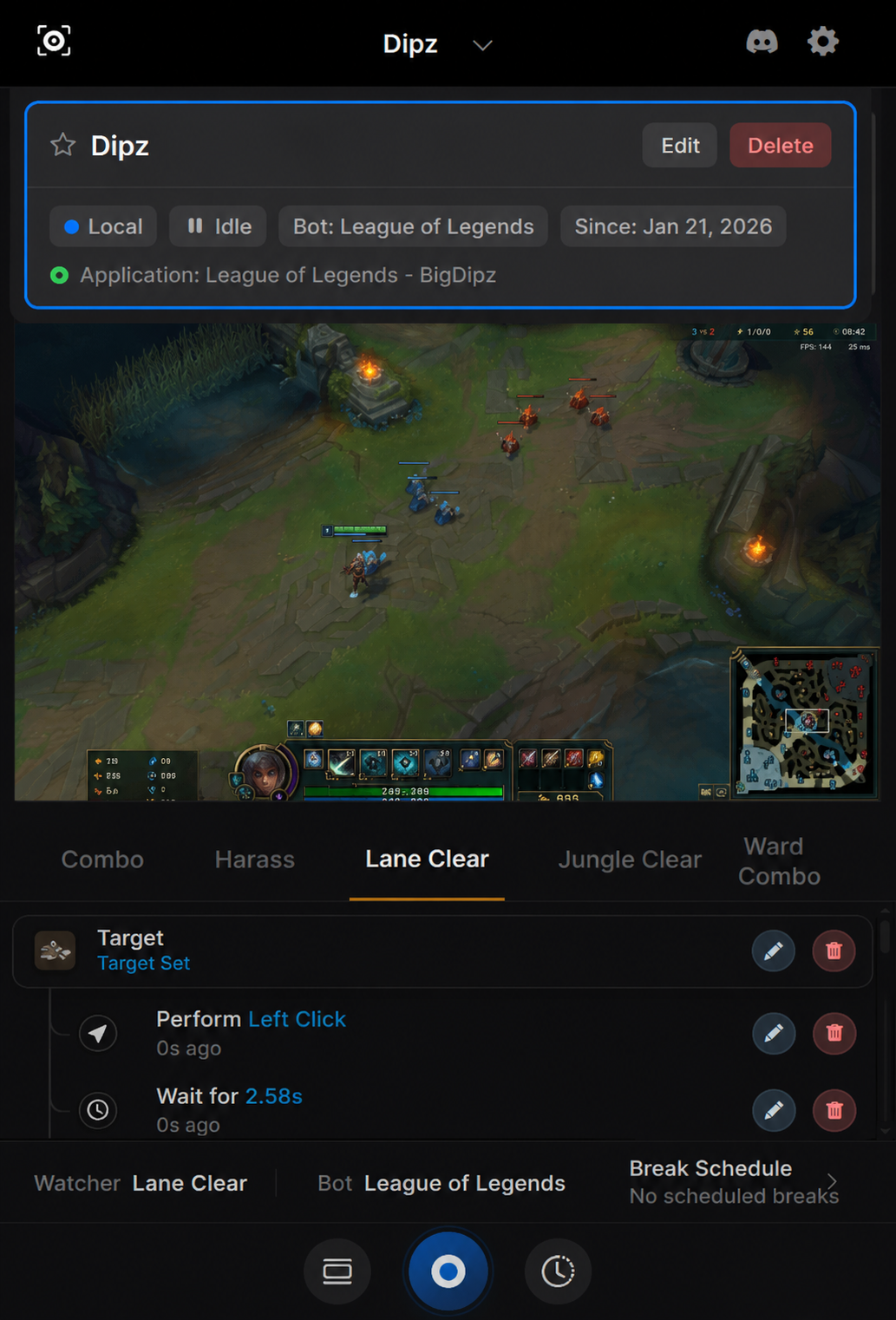
Seamless synchronization between Desktop power and Mobile freedom.

Web Dashboard
Mobile Dashboard Mobile Selection

Instant Sync

Actions on mobile reflect instantly on desktop clients.

Encrypted Stream

Zero-latency, military-grade connection to your fleet.

Native Performance

Dedicated desktop apps for maximum hardware efficiency.

System Architecture

V 3.0

Modular logic available in the builder.

i

Demo Context: We use Runescape in these examples to demonstrate complex logic, but these tools work universally on any game.

Smart Interaction.

Intelligent click handling with randomization logic to mimic human input patterns.

Drag & Drop.

Complex inventory management with human-like drag speed curves and hesitation.

Object Discovery.

Scans the viewport for specific game objects or resources dynamically.

Zone Searching.

Divides the screen into efficient search sectors to optimize detection speed.

Quick Insert.

Rapidly inject code blocks into your workflow without breaking flow.

Multi-Select.

Group and modify multiple logic nodes simultaneously.

Health Tracking.

Real-time OCR and color detection to monitor HP/Mana and trigger failsafes.

Workspace Watchers.

Passive background monitoring threads that react to sudden game state changes.

UI Recognition.

Detects open windows, chat messages, or system prompts instantly.

Target Locking.

Advanced filtering to ignore decoys and lock onto the correct entity.

Humanized Jitter.

Micro-movements added to cursor paths to bypass heuristic detection.

Offset Logic.

Randomized click points within a target's bounding box to avoid pixel stacking.

Input Variety.

Switch between left, right, shift-click, and double-click actions.

Keyboard Emulation.

Programmable keystrokes with variable hold times and delay intervals.

State Triggers.

Conditional execution logic based on player animation or resource state.

AI Chat Response.

LLM-integrated responses to in-game chat to maintain social cover.

Procedural Tasks.

Generates unique task sequences every runtime to prevent pattern banning.

Action Cloning.

Rapidly duplicate complex logic blocks to scale up bot functionality.

Fiery gaming asset
Glowing blue gaming asset
Gaming character with swords
Join Stracti

Build Bots
For The New Era
Of Gaming.